Hauptfunktionen
Startmenü
Navigation
- Benutzerdefinierte Anheftungen
- Integrierte Suche
- Empfohlene Apps
Windows-Sicherheit
Schutz
- Integriertes Antivirus
- Firewall
- Sicheres Surfen
Microsoft Store
Anwendungen
- Verifizierte Apps
- Automatische Updates
- Spiele und Dienstprogramme
Multimedia
Fotos und Videos
- Integrierte Fotos-App
- Screenshot
- Video-Editor
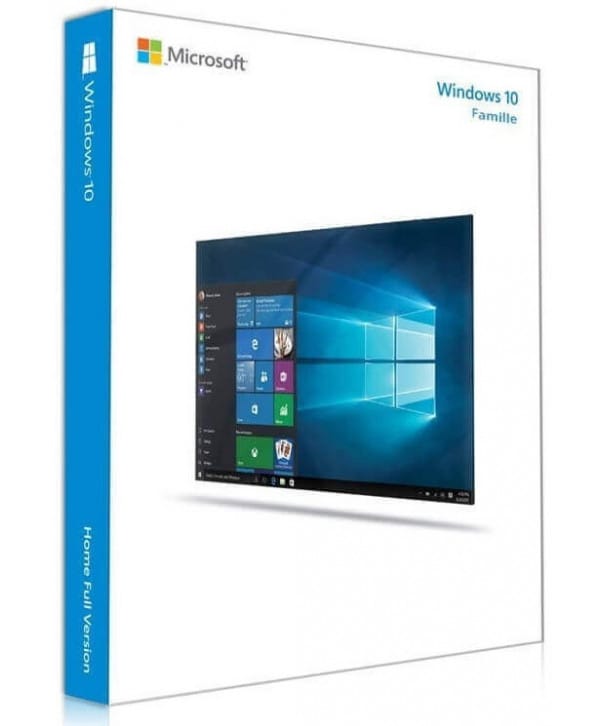
Windows 10 Home
Dauerlizenz - Installation auf PC - Offizielle Microsoft-Online-Aktivierung
Nur noch 86 Lizenzen zu diesem Preis verfügbar
Offizielle Microsoft-Lizenz, auf den Microsoft-Servern verifiziert.
Warum Windows 10 Home wählen?
- Intuitive und moderne Benutzeroberfläche für Ihren täglichen Gebrauch
- Integrierte Windows-Sicherheit mit Antivirus und Firewall
- Kompatibilität mit Ihren Lieblingsspielen und -anwendungen
- Automatische Sicherheits- und Funktionsupdates
- Dauerlizenz, keine monatlichen Gebühren
- Offizielle Aktivierung über die Microsoft-Server
Windows 10 Home
Windows 10 Home ist das ideale Betriebssystem für den täglichen Gebrauch. Surfen im Internet, Büroarbeit, Streaming, Gaming — alles läuft flüssig mit einer klaren, intuitiven Benutzeroberfläche.
Sicherheit ist nativ integriert: Windows Defender Antivirus, Firewall, Echtzeitschutz. Es ist nicht nötig, ein separates Antivirenprogramm zu kaufen. Dauerlizenz, offizielle Online-Aktivierung.
Privatanwender
Ein vollständiges, intuitives System für Ihren täglichen Gebrauch: Web, Büro, Multimedia.
Studierende
Die perfekte Umgebung für Ihre Kurse, Hausaufgaben und Projekte, mit integrierten Microsoft-Tools.
Familien
Schützen Sie Ihre Liebsten mit der Kindersicherung und der integrierten Sicherheit von Windows.
Gamer
Kompatibel mit Ihren Lieblingsspielen, optimiert für Grafikleistung.
Die Stärken von Windows 10 Home
Hybrides Startmenü
Das Beste aus beiden Welten: Live-Kacheln und die klassische App-Liste.
Virtuelle Desktops
Erstellen Sie mehrere Arbeitsbereiche, um Ihre Aktivitäten zu trennen und organisiert zu bleiben.
Windows Defender
Integriertes Antivirus und Firewall, automatisch aktualisiert für dauerhaften Schutz.
Windows Update
Regelmäßige Sicherheits- und Funktionsupdates, um Ihren PC auf dem neuesten Stand zu halten.
Technische Spezifikationen
Systemanforderungen
| Prozessor | 1 GHz oder schneller |
| RAM | 1 GB (32-Bit) oder 2 GB (64-Bit) |
| Speicherplatz | 16 GB (32-Bit) oder 20 GB (64-Bit) |
| Anzeige | Mindestens 800 x 600 Pixel |
| Grafikkarte | DirectX 9-kompatibel mit WDDM 1.0-Treiber |
| Internet | Verbindung für die Aktivierung erforderlich |
Lizenzinformationen
| Lizenztyp | Dauerhaft (lebenslang) |
| Benutzer | 1 Benutzer |
| Geräte | 1 PC |
| Neuinstallationen | Unbegrenzt auf demselben Gerät |
| Sprache | Mehrsprachig (Deutsch inbegriffen) |
| Aktivierung | Online über die Microsoft-Server |
| Support | 24/7 technische Unterstützung |
| Updates | Sicherheitsupdates inbegriffen |
Funktionen von Windows 10 Home
Modernisierte Benutzeroberfläche
Überarbeitetes Startmenü und eine flüssige Oberfläche für ein angenehmes tägliches Erlebnis.
Windows-Sicherheit
Integriertes Antivirus, Firewall und Echtzeitschutz, um beruhigt zu surfen.
Unterhaltung
Integriertes Xbox, Game-Streaming und Kompatibilität mit Ihren Lieblingsspielen.
Updates
Automatische Sicherheitsupdates und regelmäßige neue Funktionen.
Verifizierte Kundenbewertungen
Für dieses Produkt liegen noch keine Kundenbewertungen vor.
Hinterlassen Sie Ihre Bewertung
Teilen Sie Ihre Erfahrung mit diesem Produkt, um anderen Kunden zu helfen.
Installationsanleitung
Die Aktivierung Ihrer Windows 10 Home-Lizenz dauert nur wenige Minuten. Hier finden Sie die Schritt-für-Schritt-Anleitung.
Kompatibilität prüfen
Stellen Sie zunächst sicher, dass Ihr Computer die Anforderungen für Windows 10 Home erfüllt.
Windows 10 Home herunterladen
Besuchen Sie die offizielle Microsoft-Website, um das Media Creation Tool oder das ISO-Abbild von Windows 10 Home herunterzuladen.
System installieren
Starten Sie das Installationsprogramm und folgen Sie den Anweisungen. Wählen Sie Ihre Sprache, akzeptieren Sie die Bedingungen und wählen Sie die gewünschte Installationsart aus.
Ihre Lizenz aktivieren
Sobald die Installation abgeschlossen ist, gehen Sie zu Einstellungen > System > Aktivierung. Klicken Sie auf "Product Key ändern" und geben Sie den per E-Mail erhaltenen Schlüssel ein.
Brauchen Sie Hilfe?
So funktioniert es
Holen und aktivieren Sie Ihre Microsoft-Lizenz in nur 3 einfachen Schritten
Auswählen
Wählen Sie Ihre Windows 10 Home Lizenz oder Ihr Paket aus und legen Sie es in den Warenkorb.
Bezahlen
Bezahlen Sie 100 % sicher über unseren Partner Paypal.



Aktivieren
Erhalten Sie Ihren Schlüssel sofort per E-Mail mit einer ausführlichen Installationsanleitung. Unser Support ist bei Bedarf rund um die Uhr für Sie da.
Häufig gestellte Fragen
Wie aktiviere ich meine Windows 10 Home-Lizenz?
Nach Ihrem Kauf erhalten Sie Ihren Schlüssel innerhalb weniger Minuten per E-Mail. Gehen Sie zu Einstellungen > System > Aktivierung, klicken Sie auf "Product Key ändern" und geben Sie Ihren Schlüssel ein. Die Aktivierung erfolgt online über die Microsoft-Server.
Welche Einschränkungen gibt es im Vergleich zur Pro-Version?
Ist die Windows 10 Home-Lizenz dauerhaft gültig?
Kann ich Windows 10 Home nach dem Formatieren neu installieren?
Was passiert, wenn ich bei der Aktivierung ein Problem habe?
Das könnte Ihnen auch gefallen
Windows 10 Education
Windows 10 Education - Offizielle Microsoft-Lizenz. Sofortige Lieferung per E-Mail.
Windows 10 IoT Enterprise 2019 LTSC
Windows 10 IoT Enterprise 2019 LTSC - Original Microsoft-Lizenz. Sofortige Lieferung per E-Mail.
Windows 10 Enterprise 2019 LTSC
Windows 10 Enterprise 2019 LTSC - Originale Microsoft-Lizenz. Sofortige Lieferung per E-Mail.
Windows 11 Pro Education
Windows 11 Pro Education - Echte Microsoft-Lizenz. Sofortige Lieferung per E-Mail.