Wichtigste Funktionen
BitLocker
Festplattenverschlüsselung
- Datenschutz
- AES 256-Bit-Verschlüsselung
- TPM/PIN-Entsperrung
Remotedesktop
Fernzugriff
- Native RDP-Verbindung
- Zugriff von jedem Gerät
- Dateiübertragung
Hyper-V
Virtualisierung
- Virtuelle Maschinen
- Umgebungsisolierung
- Tests und Entwicklung
Erweiterte Sicherheit
Verbesserter Schutz
- Windows Defender
- Intelligente Firewall
- Echtzeitschutz
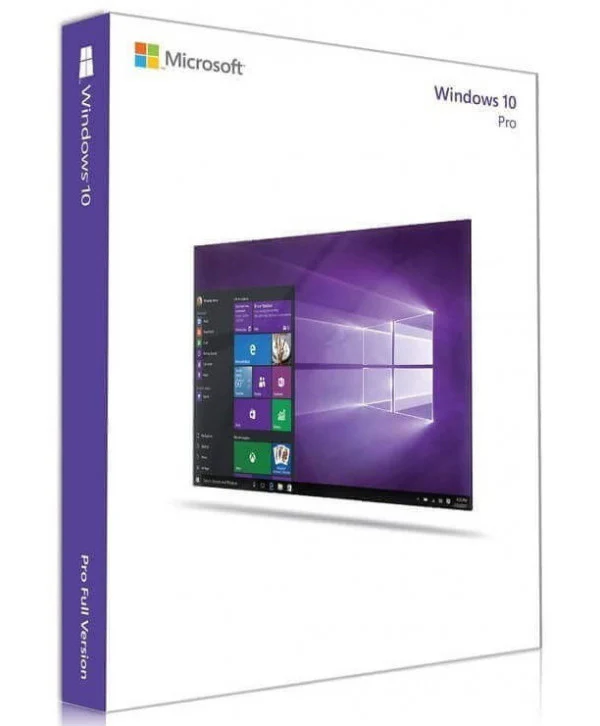
Windows 10 Professional
Dauerlizenz - Installation auf PC - Offizielle Microsoft-Online-Aktivierung
Nur noch 45 Lizenzen zu diesem Preis verfügbar
Offizielle Microsoft-Lizenz, auf den Microsoft-Servern verifiziert.
Warum Windows 10 Professional wählen?
- BitLocker-Verschlüsselung zum Schutz Ihrer geschäftlichen Daten
- Integrierter Remotedesktop, um von überall zu arbeiten
- Hyper-V zum Erstellen virtueller Maschinen ohne zusätzliche Software
- Treten Sie mühelos einer Active-Directory- oder Azure-AD-Domäne bei
- Unbefristete Lizenz ohne wiederkehrendes Abonnement
- Offizielle Aktivierung über Microsoft-Server
Windows 10 Professional
Windows 10 Professional ist die professionelle Edition von Windows 10, konzipiert für alle, die mehr als die Consumer-Version benötigen. Sie umfasst BitLocker-Verschlüsselung, Remotedesktop, Hyper-V und Domänenbeitritt — praktische Werkzeuge für effizientes Arbeiten, ob als Freiberufler oder Unternehmen.
Mit einer unbefristeten Lizenz zahlen Sie nur einmal und behalten Ihr System ein Leben lang. Die Aktivierung erfolgt online direkt über die Microsoft-Server, in nur wenigen Klicks.
Selbstständige & Freiberufler
Arbeiten Sie mit professionellen Werkzeugen (BitLocker, Remotedesktop) ohne die Komplexität einer Unternehmenslizenz.
Kleine & mittlere Unternehmen
Statten Sie Ihr Team mit einem System aus, das sich in Active Directory und professionelle Verwaltungswerkzeuge integriert.
Entwickler
Testen Sie Ihre Anwendungen in isolierten Umgebungen dank des nativ integrierten Hyper-V.
Remote-Mitarbeiter
Greifen Sie über Remotedesktop von jedem Gerät aus auf Ihren Rechner zu.
Die Vorteile von Windows 10 Professional
Hybrides Startmenü
Das Beste aus beiden Welten: Live-Kacheln und eine klassische App-Liste.
Virtuelle Desktops
Erstellen Sie mehrere Arbeitsbereiche, um Ihre Tätigkeiten zu trennen und organisiert zu bleiben.
Windows Defender
Integrierter Virenschutz und Firewall, automatisch aktualisiert für dauerhaften Schutz.
Windows Update
Regelmäßige Sicherheits- und Funktionsupdates, um Ihren PC auf dem neuesten Stand zu halten.
Technische Spezifikationen
Systemanforderungen
| Prozessor | 1 GHz oder schneller |
| RAM | 1 GB (32-Bit) oder 2 GB (64-Bit) |
| Speicherplatz | 16 GB (32-Bit) oder 20 GB (64-Bit) |
| Anzeige | Mindestens 800 x 600 Pixel |
| Grafikkarte | DirectX 9-kompatibel mit WDDM 1.0-Treiber |
| Internet | Verbindung für die Aktivierung erforderlich |
Lizenzinformationen
| Lizenztyp | Unbefristet (lebenslang) |
| Benutzer | 1 Benutzer |
| Geräte | 1 PC |
| Neuinstallationen | Unbegrenzt auf demselben Gerät |
| Sprache | Mehrsprachig (Deutsch inklusive) |
| Aktivierung | Online über Microsoft-Server |
| Support | 24/7 technischer Support |
| Updates | Sicherheitsupdates inklusive |
Funktionen von Windows 10 Professional
BitLocker
Vollständige Festplattenverschlüsselung, um all Ihre sensiblen Daten vor Diebstahl oder Verlust zu schützen.
Remotedesktop
Verbinden Sie sich von überall mit Ihrem PC dank des nativ integrierten RDP-Protokolls.
Hyper-V
Erstellen und verwalten Sie virtuelle Maschinen direkt von Ihrem Arbeitsplatz aus, ohne Software von Drittanbietern.
Erweiterte Verwaltung
Gruppenrichtlinien, Azure AD Join und Geräteverwaltung für professionelle Umgebungen.
Verifizierte Kundenbewertungen
Für dieses Produkt liegen noch keine Kundenbewertungen vor.
Hinterlassen Sie Ihre Bewertung
Teilen Sie Ihre Erfahrung mit diesem Produkt, um anderen Kunden zu helfen.
Installationsanleitung
Die Aktivierung Ihrer Windows 10 Professional Lizenz dauert nur wenige Minuten. Hier ist die Schritt-für-Schritt-Anleitung.
Kompatibilität prüfen
Stellen Sie zunächst sicher, dass Ihr Computer die Anforderungen für Windows 10 Professional erfüllt.
Windows 10 Professional herunterladen
Besuchen Sie die offizielle Microsoft-Website, um das Media Creation Tool oder das ISO-Abbild von Windows 10 Professional herunterzuladen.
System installieren
Starten Sie das Installationsprogramm und folgen Sie den Anweisungen. Wählen Sie Ihre Sprache, akzeptieren Sie die Bedingungen und wählen Sie die gewünschte Installationsart.
Ihre Lizenz aktivieren
Sobald die Installation abgeschlossen ist, gehen Sie zu Einstellungen > System > Aktivierung. Klicken Sie auf « Product Key ändern » und geben Sie den Schlüssel ein, den Sie per E-Mail erhalten haben.
Brauchen Sie Hilfe?
So funktioniert es
Holen und aktivieren Sie Ihre Microsoft-Lizenz in nur 3 einfachen Schritten
Auswählen
Wählen Sie Ihre Windows 10 Professional Lizenz oder Ihr Paket aus und legen Sie es in den Warenkorb.
Bezahlen
Bezahlen Sie 100 % sicher über unseren Partner Paypal.



Aktivieren
Erhalten Sie Ihren Schlüssel sofort per E-Mail mit einer ausführlichen Installationsanleitung. Unser Support ist bei Bedarf rund um die Uhr für Sie da.
Häufig gestellte Fragen
Wie aktiviere ich meine Windows 10 Professional Lizenz?
Nach Ihrem Kauf erhalten Sie Ihren Schlüssel innerhalb weniger Minuten per E-Mail. Gehen Sie zu Einstellungen > System > Aktivierung, klicken Sie auf « Product Key ändern » und geben Sie Ihren Schlüssel ein. Die Aktivierung erfolgt online über die Microsoft-Server.
Welche Vorteile bietet sie gegenüber der Home-Version?
Ist die Windows 10 Professional Lizenz unbefristet?
Kann ich Windows 10 Professional nach dem Formatieren neu installieren?
Was passiert, wenn ich ein Problem bei der Aktivierung habe?
Das könnte Ihnen auch gefallen
Windows 8 Professional
Offizielle Windows 8 Professional Lizenz. Sofortige Lieferung per E-Mail. Aktivierung über Microsoft-Server. Lebenslange Garantie. Support inklusive.
Windows 8 Professional N
Offizielle Windows 8 Professional N Lizenz. Sofortige Lieferung per E-Mail. Aktivierung über Microsoft-Server. Lebenslange Garantie. Support inklusive.
Windows 10 IoT Enterprise 2021 LTSC
Offizielle Windows 10 IoT Enterprise 2021 LTSC Lizenz. Sofortige Lieferung per E-Mail. Aktivierung über Microsoft-Server. Lebenslange Garantie. Support inklusive.
Windows 11 Pro for Workstations
Offizielle Windows 11 Pro for Workstations Lizenz. Sofortige Lieferung per E-Mail. Aktivierung über Microsoft-Server. Lebenslange Garantie. Support inklusive.